

Bunnico Casino Login
The login and account registration page allows players to access the casino quickly from a computer or smartphone. Bunnico registration requires an email address, password, country selection and account currency. Once logged in, players can access their balance, bonuses and account settings. New players can explore a welcome offer of 100% up to £6000. All essential account features are available within one interface, making profile management straightforward without unnecessary navigation.
Getting Started: Essential Account Details
The Bunnico Casino registration form includes several fields that can be completed in a single session. The form displays United Kingdom and GBP (£). At the bottom, players will find an agreement to the terms and conditions, alongside Register and Log In options.
| Element | Purpose |
|---|---|
| Email address | Address used for logging in, receiving notifications and recovering account access |
| Password | Personal password protecting the account |
| United Kingdom | Country of residence selected in the registration form |
| GBP (£) | Currency of the future gaming balance |
| 18+ and agreement to the terms | Confirmation of legal age and acceptance of the terms of use |
| Register / Log In | Creating a new profile or accessing an existing account |
From Registration Form to Active Account
The Bunnico Casino registration screen features a straightforward form with helpful prompts and an option to show or hide the entered password. A welcome bonus of 100% up to £6000 is also displayed. This represents information about a promotion rather than an automatic reward granted during registration. To explore the offer, players must first create an account and review the relevant terms.
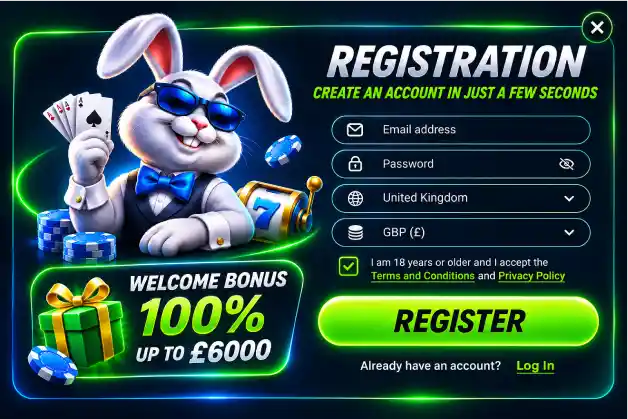
- Select Register, enter a valid email address and create a unique password that you do not use for other services.
- Check that United Kingdom and GBP (£) are selected correctly. Confirm that you are of legal age and agree to the Terms and Conditions and Privacy Policy after reading them.
- Submit the form, complete any required contact verification and open your personal account to configure additional settings.
When completing the Bunnico registration form, it is worth checking your email address carefully, as it will be used for important account notifications. If the platform requests further personal information, enter the details exactly as they appear in your official documents. This can help make the account verification process smoother.
Returning to Your Account Without Registering Again
Existing account holders can sign in using the Log In option. Generally, only the email address provided during registration and the corresponding password are required. After signing in, players can view their balance, transaction history, bonuses and notifications. There is no need to register again.
- Before entering your details, check the website address and use only the official login form.
- When using a shared device, avoid saving your password in the browser and always log out after finishing your session.
- Once logged in, review your personal settings and make sure your contact information is up to date.
When accessing an account from a smartphone, Bunnico adapts the login form to smaller screens. Fields are arranged vertically for convenient completion, while account access is available through a mobile browser. The same profile can be used across different devices.
Updating Your Password and Recovering Account Access
Forgetting your password does not mean you need to create another account. On the login page, locate the password recovery option, enter the email address associated with your profile and follow the instructions provided in the recovery message. Choose a new, strong password to protect your account.
- Open Bunnico Casino Login and select the password recovery option instead of registering again.
- Enter the email address linked to your account, check your inbox and follow the instructions provided through the recovery link.
- Create a new password, log in using your updated credentials and check whether you need to sign out of other active sessions.
If you no longer have access to your registered email address, contact customer support through the available help section. The support team can explain the account ownership verification procedure and the steps required to update your contact details. Never share your password or full payment card number in a chat.
Identity Verification and Preparing Your Documents
Verification at Bunnico helps connect an account to its rightful owner and supports the correct processing of transactions. The process may require proof of identity, confirmation of residential address and information about the payment method used. Personal details entered during registration should match the information shown in official documents.
| Stage | What to Prepare | What to Check |
|---|---|---|
| Identity verification | Passport, identity card or driving licence, where accepted | Document validity and readability |
| Residential address | Bank statement or utility bill showing your address | Name and address matching the account details |
| Payment details | Proof of ownership of the selected payment method | Uploading documents only through a secure form |
| Application status | Notifications and verification section | Status updates following document review |
At Bunnico Casino 9, checking personal information should form part of account management rather than requiring a separate registration. If a document request appears after your first deposit, open the relevant account notification and follow the instructions provided. Prepare clear photographs of any requested documents.
Your Personal Dashboard: Settings Worth Checking
Once logged in, your Bunnico account can be used for everyday activities without completing the registration form again. Players can monitor their balance in pounds, track deposits and withdrawal requests, review active bonuses and contact customer support. Contact preferences and security settings can also be managed through the account interface.
- Balance and transactions: review credited funds, transaction statuses and changes recorded in your account history.
- Bonuses: check the availability of the welcome offer of 100% up to £6000 and review its terms of use.
- Settings: update contact details and review available deposit limits and session duration controls.
At Bunnico Casino 9, it is more convenient to manage account activities in a logical order: first check your personal information, then review your verification status before proceeding to the cashier. This approach provides a clearer understanding of whether your account is ready for use. Bonus-related actions do not change your login credentials.
Registering on Your Phone: A Practical Guide
A mobile browser allows players to complete the same registration stages as the desktop version. Whether creating an account at home or while travelling, open the registration form, enter your email address, set a password and confirm that the selected country and GBP (£) are correct. Email verification can be completed in another browser tab.
- Open the registration form on your smartphone and complete the required fields, making sure your keyboard does not automatically change your email address or password.
- Read the terms, confirm that you are of legal age, complete registration and follow any contact verification instructions.
- Once logged in, review your balance, personal limits and notifications to prepare your account for use.
When returning on a smartphone, Bunnico Casino Login can be accessed through the same website, using the same credentials across different devices. To protect access to Bunnico, use a screen lock, keep your browser updated and choose a trusted internet connection. When using a public device, always end your active session before leaving.
Personalise Your Account Access to Suit Your Routine
New Bunnico users should begin by checking their email address, password, selected currency and personal information. Existing account holders may find it useful to review their contact details, login history where available, document verification status and personal limits regularly. These simple checks make everyday account management easier.
- Store your login credentials in a trusted password manager.
- Never share verification codes with other people.
- Set personal financial and time limits before playing.
FAQ
What should I do if my registration confirmation email does not arrive?
First, check your Spam and Promotions folders and make sure you entered the correct email address. If the message is still missing, use the resend confirmation option if available, or contact Bunnico Casino customer support.
Can I view my deposit and withdrawal history in my personal account?
Your transaction history helps you monitor the movement of funds in your account. In the relevant profile section, you can review available records of deposits, withdrawal requests, transaction amounts and processing statuses.
Will my gaming balance remain available after I log out?
Logging out ends your current session but does not reset your account balance. After signing in again, you can review your available funds, active bonuses and transaction history.
How can I change the email address linked to my Bunnico account?
To update your registered email address, check the available settings in your personal account. Changing your contact email may require confirmation through your previous or new address. If the relevant option is unavailable, contact online customer support for assistance.
Can I temporarily suspend access to my personal account?
Players who wish to take a break can use the available responsible gambling tools, including temporary account restrictions or self-exclusion. Review the conditions and duration of these restrictions in the relevant account section or contact customer support for further information.