

Bunnico Casino Mobile App
The mobile version of Bunnico Casino provides access to the gaming lobby, live tables, bonuses and personal account directly through a smartphone browser. The interface brings together Slots, Live Casino and Table Games categories, a search function, balance top-ups and customer support. Touchscreen navigation makes it easy to move between sections without a computer, while your account retains its transaction history. It is a practical way to access the casino on Android devices, iPhones and tablets.
A Gaming Environment Designed for Smaller Screens
The mobile layout of Bunnico Casino places its main functions within easy reach. At the top of the screen, players will find the menu, platform name and balance indicator with a deposit button. Below the promotional banner are shortcuts to Lobby, Slots, Live Casino, Table Games and Promotions. The bottom navigation bar contains Home, Search, a central launch button, Deposit and Support. This arrangement is particularly useful when holding a phone in one hand, as everyday functions can be accessed without navigating through several pages.
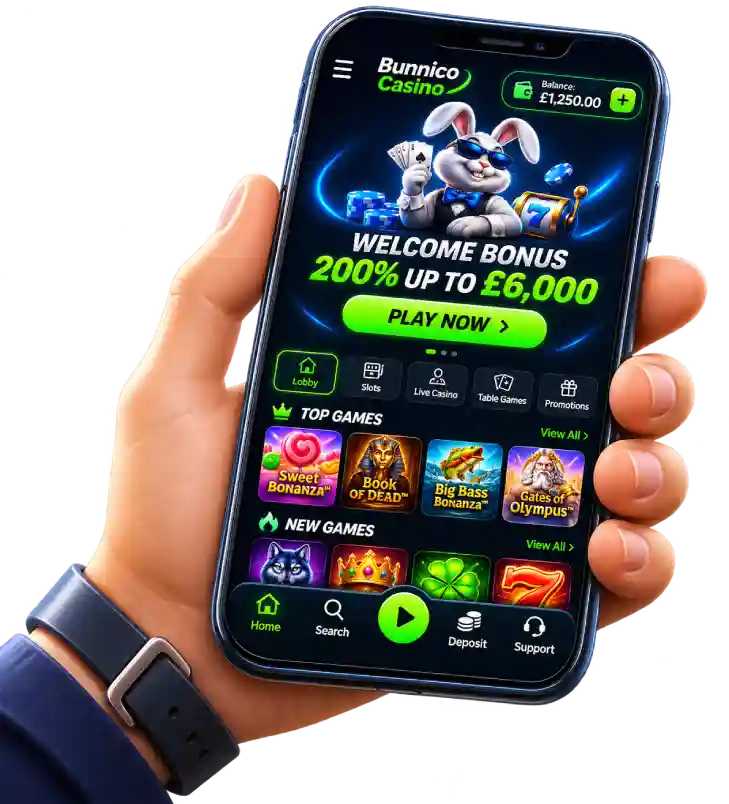
The home screen also features Top Games and New Games sections with horizontally arranged game cards. Sweet Bonanza, Book of Dead, Big Bass Bonanza and Gates of Olympus are highlighted, while a View All option appears alongside the collection headings.
| Feature | Purpose on Mobile |
|---|---|
| Lobby and Home | Return to the main selection of games |
| Search | Find slots and other games by name |
| Slots / Live Casino | Switch between slot machines and live tables |
| Deposit and balance | Check available funds and open the cashier |
| Promotions | Browse promotional offers and their terms |
| Support | Contact online customer assistance |
Browser Access Without Compulsory Installation
The term Bunnico Casino Mobile App refers here to accessing the platform through a mobile device rather than a confirmed standalone application download. Android users can open Bunnico Casino through Chrome or another modern browser, while iPhone users can use Safari. Simply visit the casino website, select the required category and sign in. If your browser supports home screen shortcuts, you can add a website link to your device's home screen for convenient access with a single tap.
This shortcut can be particularly useful for players who regularly check their bonus balance or return to a particular game category. A Bunnico Casino shortcut opens the website rather than installing an application from the App Store or Google Play.
- On Android, open the website in Chrome, tap the browser menu and look for the option to add the page to your home screen, if available.
- On iPhone, open the website in Safari, use the Share menu and select the option to add it to your Home Screen.
- Once the shortcut has been created, check that it opens the correct page. Keep your password stored separately from the shortcut.
Finding Slots and Starting Quick Gaming Rounds
The touchscreen catalogue at Bunnico Casino offers two convenient ways to find games: searching by name or browsing a particular category. If you already know which game you want, simply select Search and enter its title.
Among the quick-play formats available in the Bunnico Casino catalogue are Plinko, Dice, Limbo, Mines and Lines from Hacksaw Gaming, Diamond Mines from BetSoft, and iMoon Crash, Crash Range, Crash Classic and Crash Over/Under from iMoon. These games are particularly suited to mobile browsing because of their short rounds and prominent interactive controls.
Live Tables in Portrait and Landscape Modes
The mobile section of Bunnico Casino provides a dedicated shortcut to Live Casino. Featured titles include Italian Roulette, VIP Live Roulette and Greek Roulette 500x from Amusnet, alongside Opera Roulette and Top Card from Winfinity. Before starting, players can review the available betting limits, table descriptions and controls. A stable internet connection is important for live streaming, while landscape orientation may provide more room for the video feed and betting panel if supported by the individual game.
On a smaller display, Bunnico Casino players may find it helpful to review the payout table and betting countdown before using the chip controls.
| Category | What to Check Before Playing |
|---|---|
| Video slots | Paytable, spin features and RTP where available |
| Live Roulette | Betting limits, countdown timer and table layout |
| Crash | Multiplier rules and round completion conditions |
| Plinko / Mines | Risk settings and selection rules |
Account Balance, Bonuses and Payments on Mobile
After signing in, Bunnico Casino allows players to move from browsing games to managing their accounts. The mobile interface displays the balance and Deposit option. Through the cashier, users can select an available payment method, enter an amount and confirm the transaction according to the payment provider's instructions.
The mobile layout features a promotional banner advertising 200% up to £6000, while other bonus cards include a welcome offer of 100% up to £300 with 200 Free Spins, a second deposit bonus of 50% up to £200, a Weekly Bonus of 50% up to £1000 and a Reload Bonus of 75% up to £2000. Therefore, when using Bunnico Casino Mobile App, the active Promotions card and its terms should be the main reference for any particular offer rather than the homepage banner alone. Check the bonus percentage, minimum deposit, wagering requirements, validity period and remaining free spins.
Creating an Account and Signing Back In
Mobile registration at Bunnico Casino involves the same basic fields as the desktop version: Email address, Password, United Kingdom as the country and GBP (£) as the account currency. Players must then confirm that they are of legal age and have reviewed the terms. Once the account has been created, returning users can select Log In. Forgotten passwords can be recovered using the registered email address.
- Before submitting the form, check your email address and selected account currency.
- For financial transactions, prepare verification documents if they are requested.
- When using someone else's phone, always log out after completing your session.
If you have any questions, Bunnico Casino provides access to a help centre featuring the Chat with us now option. Never share passwords or complete card details through chat, and upload documents only through the designated verification form.
Making Everyday Mobile Access More Comfortable
As a browser-based experience, Bunnico Casino Mobile App is convenient for quickly accessing favourite categories, checking the cashier or opening customer support chat. For reliable performance, keep your browser updated, use a secure internet connection and remember to sign out when using shared devices. Before playing, consider setting a budget and session time limit, and make use of responsible gambling tools whenever needed.>To tailor Bunnico Casino to your smartphone, start by exploring the mobile lobby, testing the search function and adding a shortcut to your home screen.
FAQ
Can I use Bunnico mobile casino in full-screen mode?
Some games support full-screen mode, which hides unnecessary browser elements and increases the available gaming area. If the developer provides this feature, it can be activated through the settings menu within the game.
How can I switch between slots and Live Casino on my smartphone?
The Bunnico Casino mobile lobby has separate Slots and Live Casino categories. Simply return to the navigation menu and select the required section. Games can be opened without having to log in to your account again.
Can I view Bunnico Casino VIP benefits on my phone?
Information about the loyalty programme can be found in the bonus section or personal account. The VIP programme features four levels with weekly cashback of 3%, 5%, 10% and 12%, alongside additional rewards depending on membership status.
Do I need to enable location services to play through a mobile browser?
Access to certain casino features may depend on the player's country of residence or current location. If the website requests permission to determine your location, the browser will display a notification. Location permissions can be managed through your device settings.
Can I browse the Bunnico Casino mobile lobby without logging in?
The homepage, game categories and promotional information may be available without signing in, provided these sections are accessible to visitors. Logging in is required to use your personal balance, activate bonuses and complete financial transactions.
How can I change the Bunnico Casino interface language on my phone?
If the platform supports multiple languages, the language selector may be available in the main menu or profile settings. Once a language has been selected, the interface will display the corresponding section names, buttons and system notifications.